Pages

Thursday, September 30, 2010

Taking Ownership


One of our second grade classes is on its third day using the iPads in their literacy centers, and another class just got started today. It was interesting to sit in on both our "veteran" (of three days) class and our beginning class and notice the difference a few days has made. In the more experienced class, students navigated smoothly to a new sight word video, reset the video upon finishing, and then started the Spell Blocks with Sight Words app. Without prompting, students began to explore the settings in Spell Blocks with Sight Words to adjust the challenge level to meet their needs.
In contrast, the beginning class was still in teacher-directed mode and struggled a bit just to get the movie to play and pause as they wished.

Navigation issues aside, I feel the veteran class is starting to think differently about the iPad and to look for ways they can customize it to their needs. This is something we anticipated
would happen, and I am
glad to see it happening so soon -- so our planning discussions will now turn to differentiation and how we can use the iPads to customize the learning experience for individual students.

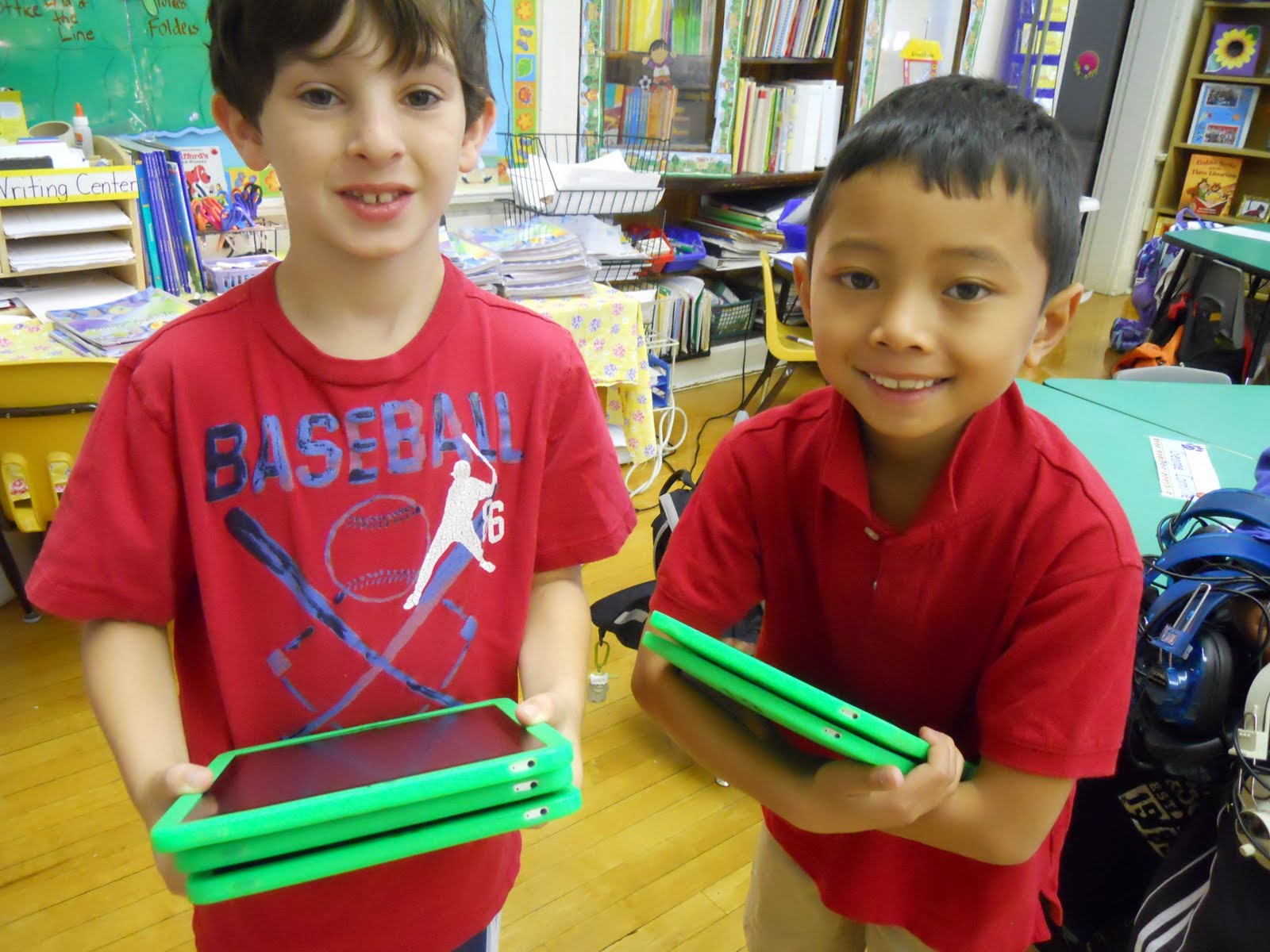
Students are also taking increasing ownership of the management of the equipment. Each room has a team of three students who go to the cart, unplug the iPads, and carry them to the classroom. They take this job very seriously!

There has been so much progress over the last three days, and I can't wait to see what next week will bring.


Tuesday, September 28, 2010

First day with student literacy centers!


Today our second graders started using the iPads in their literacy centers. We set up the iPads so there are three screens of apps -- one for literacy practice, one for art and publication, and a third for teacher apps. As each group of 5 students came to the center, I showed them how to navigate through the screens and, specifically, how to navigate a video. There was a little confusion between the video progress bar (at the top) and the volume slider (near the playback controls), so that was something we talked about.

For today's content, we used a sight word video that prompted students to read the word silently, pause the movie, write the word, and then listen to the word and a sentence including the word. Sight word recognition will help second graders build reading fluency and comprehension, and practicing sight words is always an important activity in the early months of the school year. Without exception, the activity went smoothly and students were engaged throughout. I am thinking of making a companion video to this one that will present the words in more rapid succession to help with memorization. The current video is more of a guess-and-check model, where students can check their reading by hearing the word after they've had some time to read it to themselves.

Tomorrow we will use the Spell Blocks with Sight Words application as a second literacy center activity, and then begin the fluency recordings. I will also teach the student tech teams how to set up the literacy center themselves. We are so excited to be underway!


Monday, September 27, 2010

Numbering the iPads

So this may not be the most earth shattering revelation, but I think it was a small stroke of genius on the part of our excellent Apple Professional Development trainer, Bruce Ahlborn. Rather than relying on the numbers we have hand-written on the outside of the silicone cases to tell which iPad is which, we are also making jpeg images in Keynote that have the iPad number on them in a large font, and those will become the iPad wallpaper. Simple, visible, helpful, and won't rub off -- an incredibly helpful detail!

Wednesday, September 22, 2010

Almost ready...

Next week we will start using the iPads in our second grade literacy centers. We have been working on some student pre-surveys to learn a bit about their current confidence level with technology and their level of awareness of different types of technology-based learning tasks. Because the students are so young, this process has been a bit of a challenge! My general impression so far is that kids have some awareness of using technology to play games and perhaps to find some information, and I can't wait to see how their knowledge and confidence grow over the course of the year.

There has been a good deal of behind the scenes activity since school began September 7. Finding affordable protective cases was a mundane but necessary step. After much consideration, we ended up with the delightfully named Minisuit by Vizu, which we selected for its affordable price, ease of application, and variety of color options (and perhaps partially for its fabulous name). We want kids to be able to readily identify which set of iPads belongs in their classroom, and color coding seemed like a pretty good way to do this. Sadly, the screen protectors that come with the Minisuit aren't going to cut it, and the Minisuits themselves really seem to attract classroom dust and grit -- but for the price, I still think it was a reasonable choice.

We are also working on finalizing the apps and content that will be on the iPads for their initial use. While introducing the iPads, we plan to have students using teacher-created vodcasts to practice their reading sight words and also using the Blue Fire app to record themselves reading and practice fluency.

Monday, September 20, 2010

So Excited.....

I am looking forward to creating stories for the iPads. Tina, Kelly, & I have been discussing creating a book to support our pioneer unit. :)

Tuesday, August 10, 2010

First Impressions

As Carolyn and Tina mentioned before, the iPad training last week was incredibly useful and exciting. There were frequent eruptions of “Ooh!” – “Wow!” – “Cool!” from the squad of iPad grant recipients as we navigated our way through a host of new software and tools. I can’t wait to see the reaction from our first and second grade students when they get their hands on one!

I’ve already come across an abundance of programs for the iPad that should be useful in the classroom, and everything that I mention in this post is completely free!

First off, I had never used iTunesU prior to the training, and I am still in awe of the amount of professional quality material available. There appears to be an excellent mix of resources for students from early elementary all the way to post-graduate adult learners. There are audio recordings of children’s fairy tales, there are videos of high school students working on service learning projects, and there are video recordings of entire college courses given by professors from universities such as MIT, Duke or Yale. Of course, it’s all free. Just download the latest version of iTunes, open it up, go into the iTunes Store, and there will be a tab at the top labeled “iTunesU”. This is something that you can do on any working computer - - Mac, PC, or as we were shown, iPad.

On to programs specific to the iPad, downloadable through the AppStore on the iPad:

Toy Story Digital Book

This is a great piece of introductory software for younger children available on the iPad. It is an interactive book of the first Toy Story movie. The book can simply be read to you, each word being highlighted as it is spoken, or you can record yourself reading the text on each page and play it back for later listening.

BrainPop Movie of the Day
This app features a different BrainPop movie each day for free, no account required.

iWriteWords Lite

The free version of a letter-writing game on the iPad. It gives stroke by stroke instruction for each letter, reads the word you’ve just written, and gives you a “Good job!” when you’ve finished.

Puppet Pals
The free version of this program gives you access to eight old western characters or “puppets” to create a story with. You select the actors, the backdrop, animate the puppets across the backdrop, then play it back and watch your story unfold.

A Story Before Bed
This app comes with one free book, “The Frog Princess” by Adrian Klein, with the ability to buy more books through their store for use in the app. The functionality of it is a bit limited with only an iPad, as you need a desktop/laptop to create your own recordings. But the presentation of the included story is top-notch and if you have the resources this could be a very useful program.

History Maps
Being a map-lover myself, I’ve used this multiple times already just out of personal curiosity. It features a host of maps from throughout history of various geographical locations. The maps look great and are incredibly easy to navigate on the iPad. You can browse through a long list of available maps sorted by a variety of possible areas. Sort by geographical location, time in history, or topic.

World Book: This Day in History
Another program I’ve been clicking on every day I’ve sat down with the iPad. Each day you can view a variety of historical events, births, and deaths. You can click on any piece of information to read more about it.

VideoScience
This application should be incredibly useful for any teacher of science or student with an interest in hands-on experimentation. Science teacher Dan Menelly provides text and video of him performing a multitude of experiments appropriate for the classroom.


I feel like that should be enough for a first impression, but my list is long and I’ll continue to post with references to anything I find that could be useful in the classroom.

Wow

I had such a great couple of days last week during the iPad training. I truly wish I was a student again. The opportunites for learning within these devices are endless. Even though I am somewhat overwhelmed, at the same time I am comfortable because of how user-friendly Apple has made this. I know Carolyn Skibba and Todd Strother will also be great support within our school. Bring on the iPads...

Friday, August 6, 2010

Teamwork

Reviewing the Burley iPad Project Proposal - - on the iPad!

Who needs paper?


Thursday, August 5, 2010

Here we go!

We just completed our first day of iPad training with Helen Hoffenberg from Apple, and I am already buzzing with new ideas about how these incredible devices will fit in to our classrooms. Today we learned some basics of navigation and syncing and began to delve in to accessing, creating, and sharing content. Time spent exploring iTunes U and the Podcasts (both audio and video) in the iTunes Store introduced teachers to the wealth of content available for students and teachers. We practiced creating pdf files for later access in the iBooks application, which I think will be a great way to store teacher-created resources on the iPad devices for students to access anytime they need them. I also spent some time during breaks experimenting with the free Dropbox and $0.99 Goodreader apps to think about how students could access and share teacher- and student-created content. I think there is incredible potential for students to create content for one another using the iPad! Tomorrow we will practice using an app called Caster to create podcasts right on the iPad. I have experimented with the Blue Fire app to record audio but am interested to see how Caster works and what teachers and students can create.

Our team also spent some time watching the incredible videos created by Ben Meyers, including Empty School and One Man Band. He's a young man with musical talent and an amazing drive to create, and when I see his work, I think about what kind of learning environments we can create that will open the doors to this kind of passion and creativity. What conditions make it possible for a student to pursue his or her curiosity and vision in this way? What tools enable a child to develop a personal interest to the fullest? It's clear that Ben has had access to musical instruments, high-quality technology, and of course, time and freedom. Helen shared with us that his digital portfolio has helped him earn a scholarship at the Berkeley School of Music. Not every child is a musician, but every child has something they love, and something that would energize them to continue to learn and innovate. Tapping into that is a challenge in a typical classroom, but I think it's an essential one to undertake -- and one that technology like the iPad can certainly help bring about. Just the wealth of free content in iTunes alone creates exciting possibilities for personalizing learning and supporting students' questioning and curiosity.

So I am thinking about many things after our first day of professional development. I am thinking about how to ensure that students develop a sense of ownership over these tools, and how to foster students' drive to explore their ideas and interests. I'm also wondering about logistical issues, of course -- syncing, charging, transferring files, routines and expectations -- since many of those things will be at the forefront when we are first getting started. Because we are working with first and second graders, I am thinking about all the ways audio and image can be used to support young children, both in their learning and in their expressions of what they know. I am energized and excited, and I think this is going to be a fantastic adventure for teachers and students alike.