After spending two hours a day this week watching seventh graders fill in bubbles on our state's standardized test, I am finding myself thinking about assessment. Specifically, I am thinking about the many ways the iPad has enriched and strengthened our daily assessment practices -- and the value I see in authentic, embedded, process-rich assessment that informs and improves instruction. Technology like the iPad offers incredible ways to gather meaningful data that shows student thinking and creates a rich and detailed picture of learning. It can also make assessment more efficient, save teachers time, and open opportunities for more responsive teaching.Follow along as a public elementary school in Chicago integrates the iPad into its first through fifth grade classrooms.
Tuesday, February 28, 2012
Making assessment meaningful
After spending two hours a day this week watching seventh graders fill in bubbles on our state's standardized test, I am finding myself thinking about assessment. Specifically, I am thinking about the many ways the iPad has enriched and strengthened our daily assessment practices -- and the value I see in authentic, embedded, process-rich assessment that informs and improves instruction. Technology like the iPad offers incredible ways to gather meaningful data that shows student thinking and creates a rich and detailed picture of learning. It can also make assessment more efficient, save teachers time, and open opportunities for more responsive teaching.Monday, February 27, 2012
Poetry Publishing on the iPads
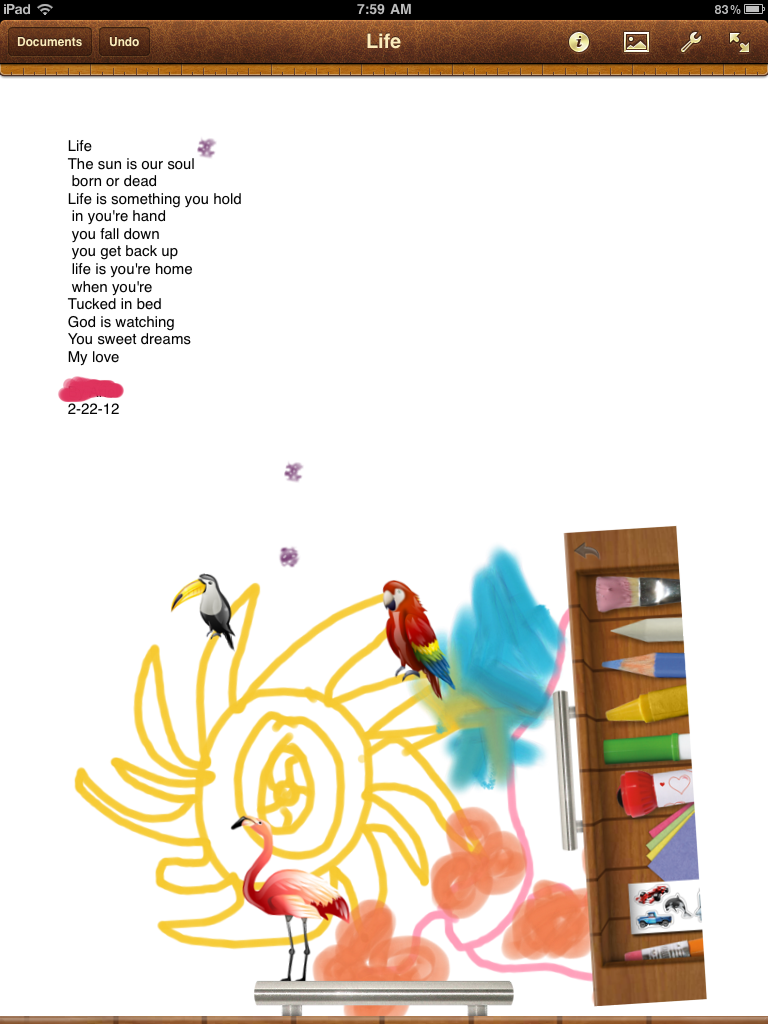
We’re in the heart of our unit on poetry. My students have learned several strategies that poets use including repetition, onomatopoeia, alliteration, visual imagery and line breaks. This week a few students wanted to draft their poems on the iPad. We had not tried this before, so I decided to let my students “have a go.”
As I watched my students carefully, I tried to think about how this experience was different than writing or publishing on paper. I noticed two big things right away.
First, the concept of line breaks and how to use them effectively was evident when writing on the iPad. Planning line breaks and reworking them to fit in a handwritten poem is labor intensive for the average first grade student. When writing on the iPad, line breaks become easy to fix, move and manipulate. This results in line breaks that make an impact for both the reader and writer.
Second, kids were more likely to revise their drafts when working on the iPad. Similar to what I observed with line breaks, it was easy for kids to manipulate the text and change the layout without having to erase, rewrite and reorganize. Many times I saw my students write a few lines then share their work with a think partner. When the think partner would provide feedback, kids were more willing to use the feedback to enhance their poem because insertion or revision was a quick fix on the iPad. In previous writing attempts, I had not seen my students work so flexibly or be as open to feedback.
There were additional benefits to writing on the iPad including the ease of organization and diverse options for sharing. Not all students desired to draft on the iPad and that is perfectly fine by me. I want to provide my students many options for thinking, writing and sharing their work. I hope to create an environment where kids move seamlessly between tools, modalities and resources.
It seems as though the students who drafted on the iPad were inspired by this experience–many wrote multiple poems and 4 or 5 are creating an ePub anthologies. I’ll try to provide an update next week on Poetry Friday.
Thursday, February 2, 2012
Active Literacy With the iPad: Part 1
When I’m teaching reading, I’m teaching students how to be active readers. That means that they need to engage with what they are reading. They need to think, talk, and write. They need to leave tracks of their thinking. Students do this by writing post-it’s and annotating the text they are reading. (Depending on they type of text.)
When I first began exploring the iPad I was thrilled to learn that iBooks allows students to write notes and highlight things. Now they could have virtual post-it’s! What was even more exciting to me was that they could e-mail me these comments to me. Here’s an example of what one of these comment pages might look like.
As
you can see, the comments come up but not the text that the student is
referring to. This can be fixed if the student highlights the sentence
or phrase that inspired that thought. This is what I plan on teaching
my students next. I think that it will be very powerful for them to
articulate specific words or phrases that have triggered their thinking.I find this format really revealing and easy to look at as well as assess. I have enough rag tag stacks of paper and this document is a quick assessment glance at the thinking my student did during the day’s lesson. I also think that when these comments are listed out like this it makes it easy to look for patterns in thinking.
In the example above I see the student is demonstrating an emotional connection with the text, they are questioning, and they are linking to their background knowledge. The comment about Pandora reveals that the student is probably connecting to their background knowledge of the mythological person Pandora and when the article refers to Pandora as a place he is attempting to reconcile this information. This would be my opening point in a conference about the text.
So what’s the catch?
Well, the catch is that this only works with iBooks that you purchase…which I have no money for, and ePUBs. The good news is that there is a way to turn any internet article into an ePUB for students to use. Thanks to Bruce “Awesomeness” Ahlborn for this tip. dotEPUB is a site that will do this dirty work for you. All you have to do is install their bookmarklet on your computer or iPad and a few simple clicks will send the article to your device.
Bam! Presto! Any internet article becomes a tool for practicing active literacy.
Management Issues
I would suggest that you, the teacher, use dotePUB on your computer and then drop it into ibooks to sync to the devices. You can install this on student iPads easily so that they can do it themselves. However, itunes will sync all of the student articles off the devices and back on to all the other devices. Which means that you now get every single article that each student Epubbed. (Is that a verb? If not you heard it here first!) It's not a huge issue but a minor headache that you can avoid.
Wednesday, February 1, 2012
Here is our first collaborative art piece that will be put up for auction at a school fundraiser tomorrow. All of these pictures were taken in our classroom, with the exception of two. All of them were taken and edited by students with their iPads! I am very, very proud of their work. In fact I'm gong to have a hard time parting with this.
Happy Digital Learning Day!
A snapshot into our learning…
Last week my class followed the Caldecott Award announcement. We were thrilled to learn that a classroom favorite, A Ball for Daisy by Chris Raschka, won! My students wanted to celebrate this accomplishment. I decided this would be a great time to introduce book trailers.
I shared several exemplary trailers with my students. Then my class created a chart detailing the attributes of a terrific book trailer. We connected with children’s author and illustrator, Katie Davis on Twitter and learned even more by studying her trailer, Little Chicken’s Big Day. Finally, my students used iMovie to create their first book trailer.
When I look at the trailers my students created, I see kids who know how to discuss literature. I observe competent technology users. I see people who know that their thinking matters and they are ready to share it with the world.
Are these first attempts at making a book trailer perfect? No, of course not. We still have lots to learn. But are their first attempts at making a book trailer powerful? Absolutely. And I’m satisfied with that for right now.
Watch the book trailer here!
Happy Digital Learning Day!
Sunday, January 29, 2012
Using Edmodo in Writer's Workshop
I've been experimenting with how to use the iPads in my fifth grade writer's workshop. I decided to try it out by launching a unit of study using my document camera, student iPads, and Edmodo. Usually we study a wide variety of mentor texts so that we can understand what the genre is and students can begin to notice good things that they want to include in their writing.
I showed projected articles and talked through them while students responded on Edmodo. I gave them one question and asked them to put their thoughts in the reply section. As the students typed their comments in I told them to post a comment and then go back and see what their classmates had written. I also told them that they could participate verbally at any time, so we had a bit of a mix of talking and typing going on.
Plus: Everyone was participating
Minus: I wasn’t really getting the quality of responses that I was looking for…yet. Twenty-nine kids on one discussion…too much!
Here is the first part of our discussion, with student names removed. You can see that they start picking up on some of the elements such as title and illustrations.
As I monitored what comments the students were making I began to ask questions and respond to them verbally in order to prompt them to go deeper. Here are some other comments from that discussion.
I notice that there is a lot of little text boxes and not one big one.Students began to see that the article was visually and graphically organized as well as organized in the writing. This was one of the reasons we chose this genre, to help students learn to organize.
For 12345 i see paw prints
Yeah wait why is it called high five?They began to look at the creative details such as creative title. High Five is a feature in Faces Magazine every month.
I like the author’s use of alliterations : five fascinating factsThey weren’t noticing much of the writing style so I made the above comment to get them thinking of it.
Started a little intro saying what your gonna learn. =]
The writer was bringing the reader inWhen the conversation got too big I started adding new questions to help them focus more.
This went on for awhile, with me prompting students to compare and contrast the articles and notice new or different characteristics as I shared various examples. Some students got tired of trying to type so they just jumped in and shared verbally while others seemed to prefer the rapid fire conversation on Edmodo.
What I liked about this was that it provided a way for everyone to be engaged and participate. Although they might have been too engaged and I’m wondering if they were really able to attend to the most important parts of the conversation. I think a debrief where we use the work we did to create a class chart would help summarize the most important elements of the genre.
One thing I did at the end of class was to post a question about topics. I asked everyone to toss out some thoughts on what they might write about because I know generating ideas is a huge struggle for many students They put together a huge list of things and I think this might have been the best part of the lesson because at the end of the day it will be the most helpful.
Wednesday, November 23, 2011
App Reviews: For Students By Students
In first grade we spend a lot of time talking about why we share our learning. I want my kids to acquire what Peter H. Johnston refers to as "agency" in his book, Choice Words. I want my kids to see themselves as active players in the global community and think of themselves as, "I'm the kind of kid who can ________." I'm the kind of kid who can save Africa. I'm the kind of kid who can develop a new app. I'm the kind of kid who can teach others even though I'm only six-years-old. When kids begin to view themselves as empowered, content-creators and information-sharers they see the relevance of their work and are inspired to do more.
With our iPad project I'm constantly asking my students why is this important and how could we share this learning with others? As a result of these types of questions, my students decided it was important that we share apps that help us learn and understand more. Using SonicPics, my students are creating video app reviews for kids in our classroom and beyond.
When asked why is this important, here is how a few kids responded:
"Because what if kids in kindergarten don't know about it and it could really help them learn."
"Well, if your parents want to buy apps this could tell them which ones are good ones."
"Maybe other schools are thinking should we get iPads? Yes or no? This could make them say, oh yes we should!"
So, check out Room 106's app reviews! We want to share our learning and hope that you learn something new from first grade!
Friday, November 18, 2011
The Power of a Camera

In 2006, our school participated in a state-wide laptop initiative. When the MacBooks with the iSight cameras arrived, at first we saw the camera as a convenience but not necessarily a transformative change. What we soon came to realize was that sometimes, increased convenience in a busy classroom of 30 children CAN be a transformative change! Having the camera always ready, always available, and seamlessly integrated with publishing and media tools makes it possible for students to document learning, create media, and capture their world at a moment's notice. Can you do this with a separate digital camera? Of course. But is it dramatically easier with a built-in camera? You bet it is. Anytime, anywhere access makes a difference with all technology, and a camera is no exception.
Monday, November 14, 2011
Using Google Forms in 1st Grade
We’ve got pets on the brain. For the past few weeks we have been reading about pets. We’ve written nonfiction text and poems about pets. We’ve collected data on pets, taken informal surveys of favorite pets and graphed our results. We interviewed our peers and asked students across to school to suggest the perfect pet for our classroom.
Now, it is time to select our classroom pet!
Here’s how technology guided this learning sequence over the past week.
First, students accessed the Google form on our classroom website.
Students had to select which pet they would like to have in Room 106 and provide a rationale for why. Using their iPads, students made their selections and submitted their vote.
At the end of the day we projected the results for the whole class to see and read the responses and rationales. My students were thrilled to see their submissions posted and motivated to read their peers’ posts. Many students tried to tally the votes in their head as we read the feedback, but I told them I’d compile the data and present the winning vote on Monday.
On Monday, using their iPads, my students acessed our classroom website. They navigated to the iPad page and viewed the results. To make this task accessible for all students, I paired photos, text and a pie chart to reveal the pet vote information.
And the winner is…a hermit crab! I wish I had videoed their excitement as the results were revealed.
Though this experience could have been done with markers and paper, technology enhanced this experience for my students as it provided a new mode and method for collecting data. Taking a survey on the iPad signified importance for my students; therefore, they worked hard to provide a detailed rationale that accurately communicated their thinking. Students increased the audience for their work as all children had the opportunity to read the posts as they were projected. This act connected the thinking and the collaboration taking place in our classroom and engaged my students actively as members of the learning community. In addition, my students were able to view data represented in multiple modes–this provided increased access for diverse learners and will hopefully build background knowledge for the next time students view data. Finally, this sequence built technology skills for accessing a website, completing an online survey and viewing data electronically.
How fun is that? There’s nothing better than students who are engaged, motivated and having fun learning!
Thank goodness the rat and the snake did not get many votes! I’m not sure what data I would’ve shared if that had happened…
Thursday, October 27, 2011
Extra practice with ten frames and number sentences
This week my students began using ten frames in math. Students used math counters and ten frame worksheets to add numbers 1-10. We did a few math practice pages throughout the week, but I noticed a few students still needed some additional practice opportunities.
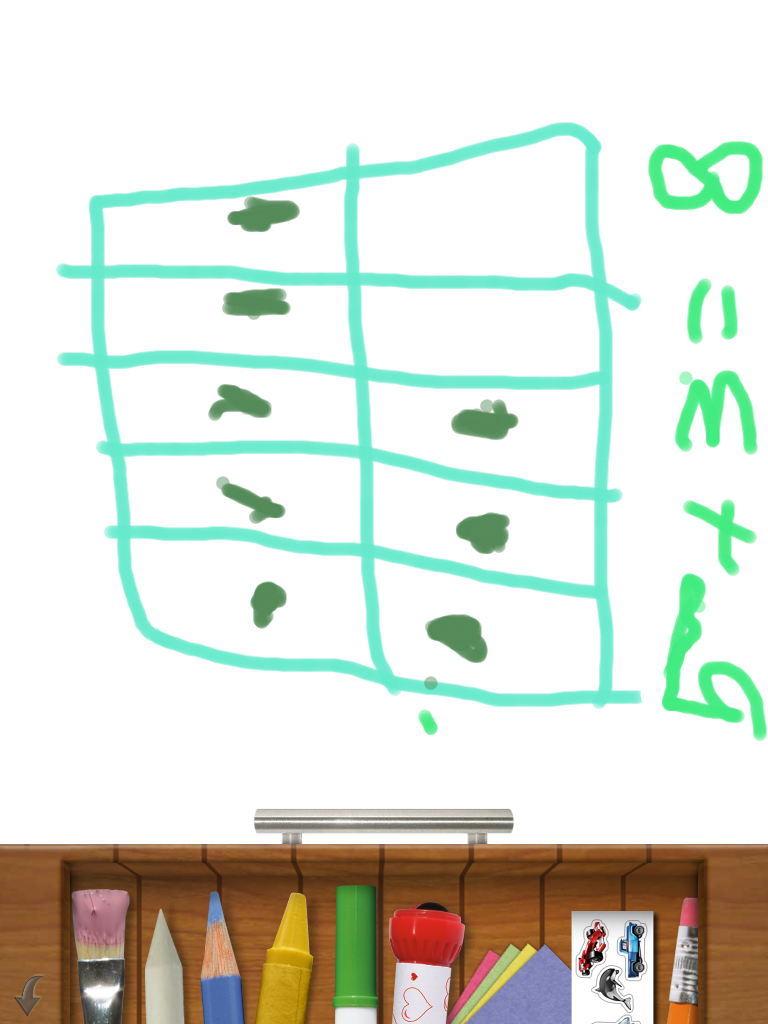
Using the iPad and the Drawing Pad App, students created their own ten frames to demonstrate their understanding. Initially, students created their own number problems. They illustrated the ten frame and wrote a corresponding number sentence. At the end of the practice time, I asked all students to create a ten frame that represented the number “8″. Students then took a screen shot of their ten frame and sent the photo to me via email.
Today (from the comfort of my couch!), I was able to view their photos and use their ten frame drawings to assess who understood how to use a ten frame and write a corresponding number sentence. These photos provided a quick and authentic way for me to use student work to plan for next week’s instruction. Additionally, I now have documentation of each child’s learning that I can share easily with their families. What a treat to have opportunities for extended practice right at our fingertips! Another fun day of learning with the iPads!